BPS Insights: Clinician User Manual
Proof of concept (POC) at poc.bpsinsights.com · Version: October 15, 2026
Please read first. BPS Insights is a proof of concept. It is built with HIPAA safeguards; formal review pending. Please don’t rely on it as your record system, and read Known POC limits before using it with a real client.
Contents
- What BPS Insights is
- Getting started
- Inviting a client
- Verifying the link (safety number)
- What you see once a client shares
- Ending a link (revocation)
- Privacy: who can read what
- Known POC limits
- FAQ
1. What BPS Insights is
BPS Insights is a free, privacy-first app that helps people track the bio-psycho-social parts of their lives in one place:
- Mood: a drag-to-place Mood Map (how pleasant, how much energy), plus a Quick mood with a short note.
- Journal, sleep, food and macros (USDA food search, saved meals), activity and strength training, time with people, symptoms (including custom ones) and, if the client turns it on, cycle tracking.
- Insights that look for patterns across these. They describe patterns, not causes.
- Follow-up check-ins: about 35 minutes after an intense mood, the app sends a push notification asking how the client feels now, so the client (and you, if they share Mood) can see how the feeling changed.
Everything is encrypted on the client’s own device. The BPS Insights server and its admins can’t read anyone’s health data.
The clinician link lets a client share chosen categories with you, for example only Mood and Journal, so you can see between-session context without asking them to fill out extra forms.
2. Getting started
- Create an account at poc.bpsinsights.com, the same way a client does.
- Apply as a clinician. Open the Care tab and tap Apply next to “Are you a licensed clinician?”. Enter the name clients will see (for example “Dr. Alex Rivera”), your credential (for example LMFT, LCSW, PsyD), your license state(s) and your license number, then tap Submit for verification.
- Wait for verification. BPS Insights staff check your license with your state board by hand before you can invite clients. Staff never see your clients’ data.
- Once you’re approved, the Care tab shows a My clients card with a Verified clinician badge and an Invite a client button.
BPS Insights is US-only.
3. Inviting a client
- Go to Care → My clients → Invite a client.
- The app shows a 12-character code, like
BSBR-4VWS-FPSB. Each code is single use and expires after 7 days. - Tap Copy and give the code to your client, in session or through a channel you already use with them.
- Your client opens Care → Enter a link code, types the code and taps Link.
- The client appears in your My clients list marked Waiting (“Waiting for your client to accept”) until they verify and consent.
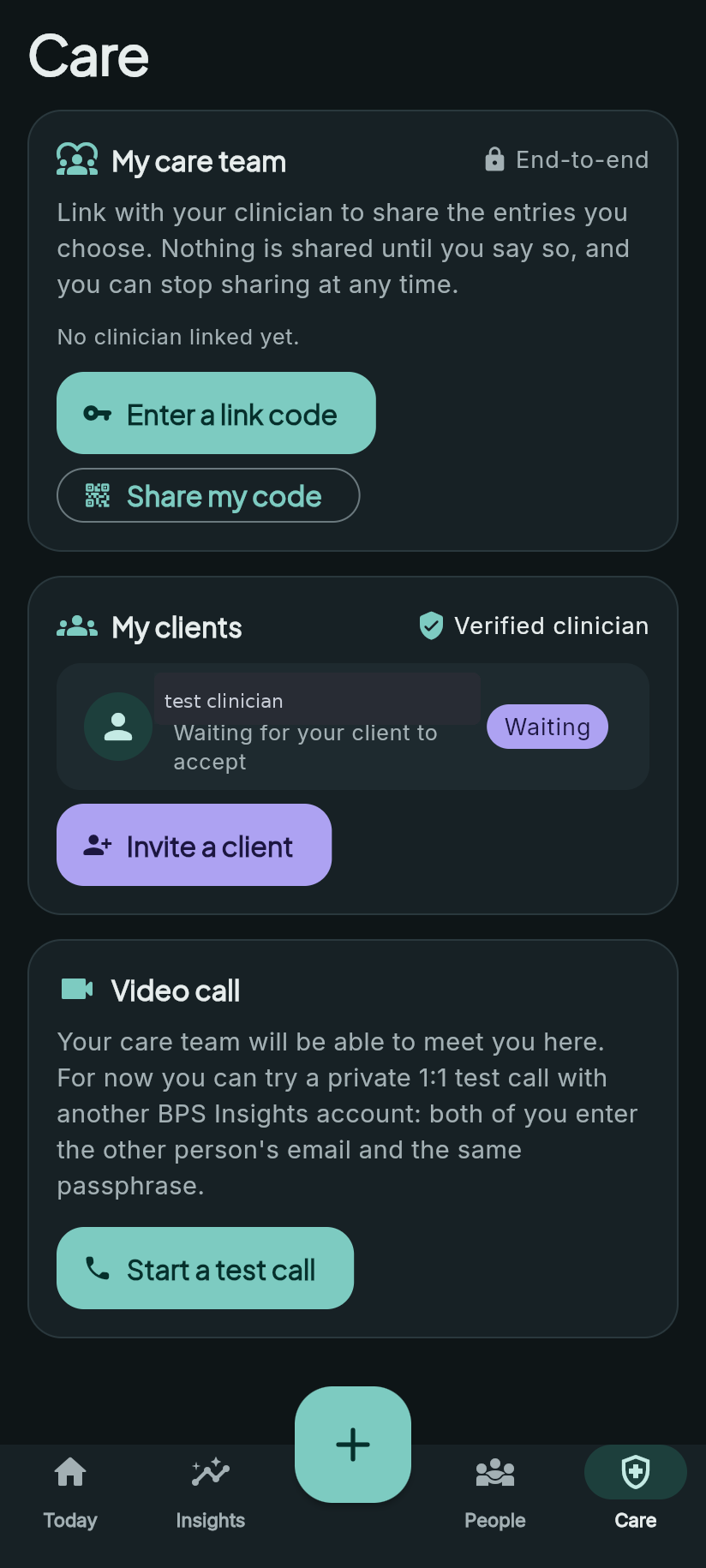
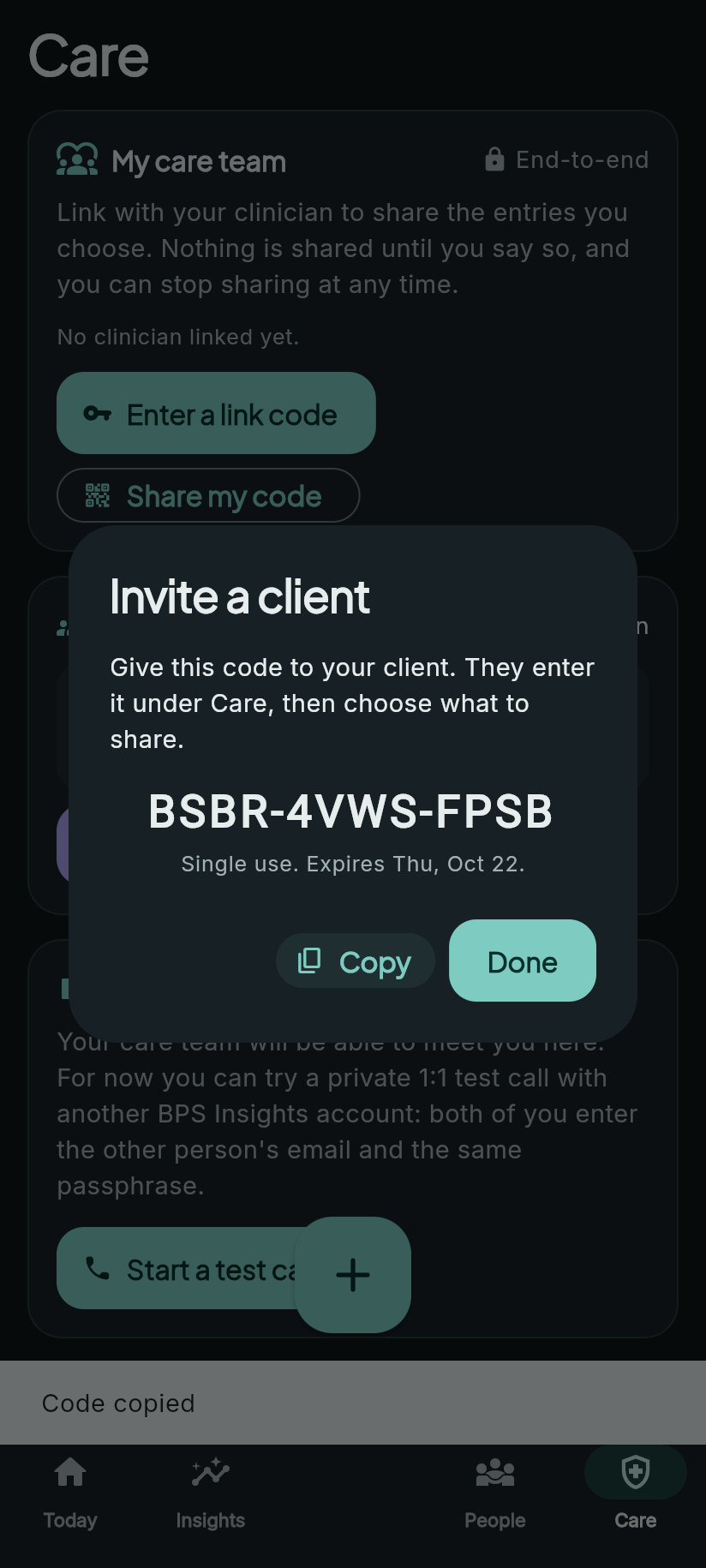
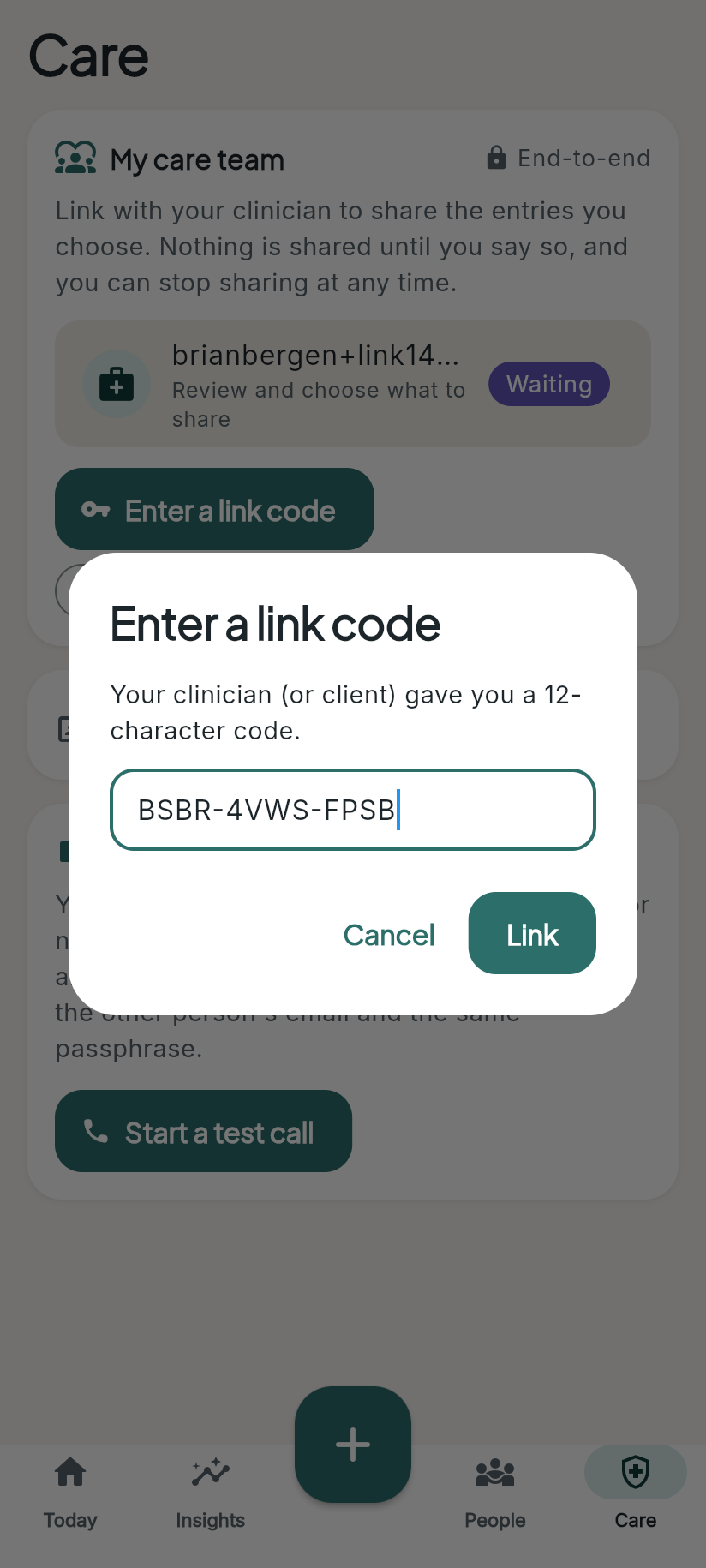
Screenshots are from the POC with test accounts.
4. Verifying the link (safety number)
Before anything is shared, you and your client make sure you’re really connected to each other, and not to an impostor.
- Tap the waiting client in My clients. You’ll see a safety number: 60 digits in 12 groups of 5, plus a QR code.
- Your client sees a safety number on their side, too. The two must match exactly.
- Compare them in one of these ways: - In person: hold the phones side by side and compare the digits. - On a video call: read the digits aloud to each other.
- Under Did the numbers match?, choose how you compared them, then tap Numbers match: mark verified.
- If any digit is different, stop. Tap Decline and contact your client another way.
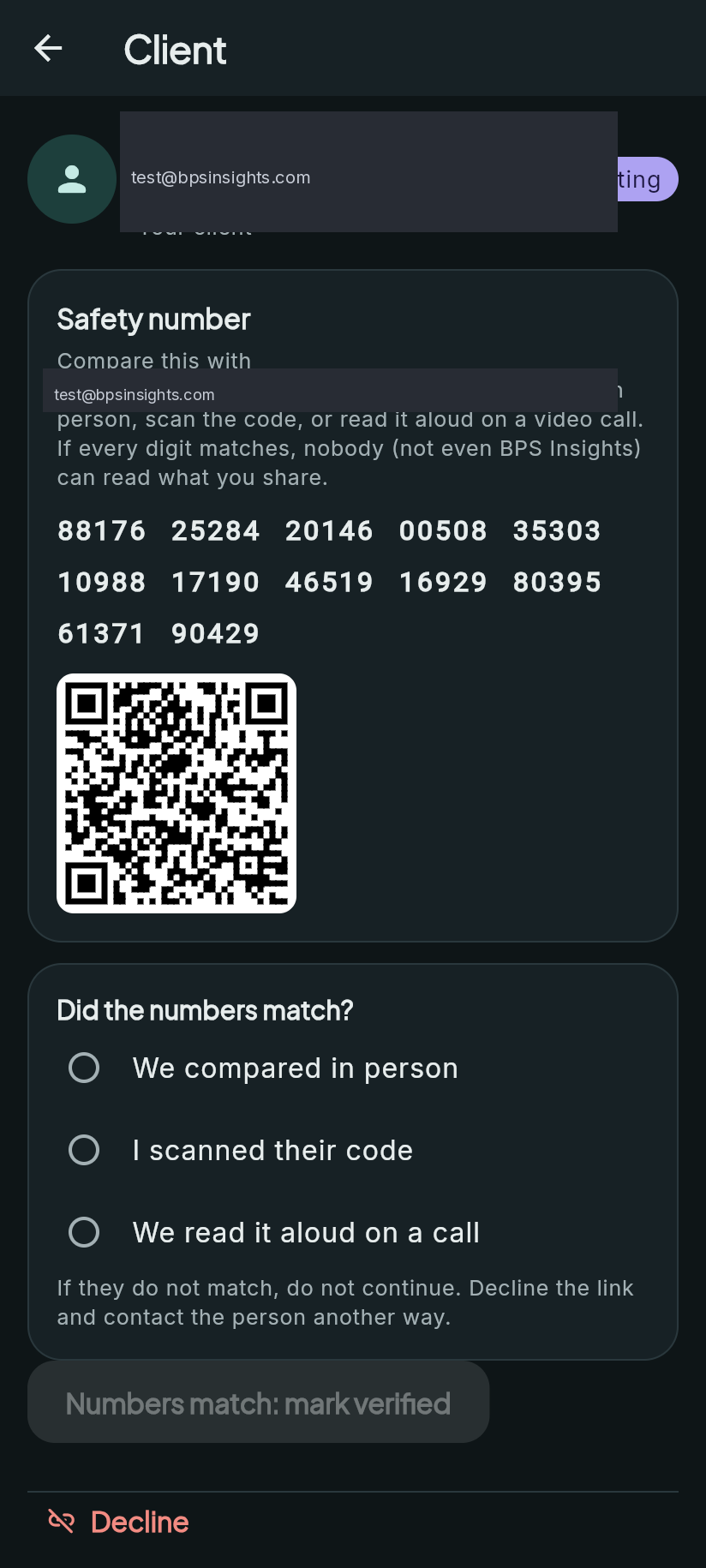
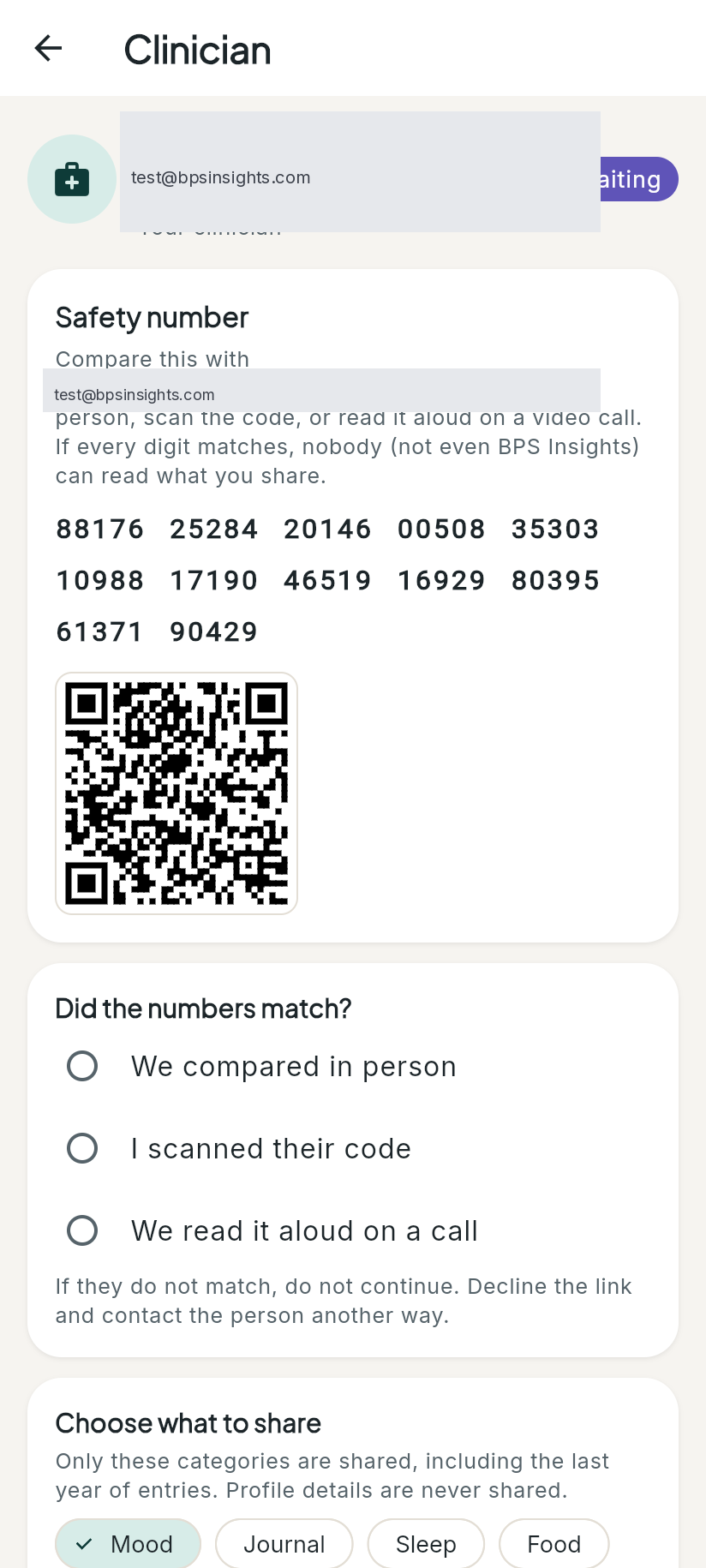
QR codes: the app shows a QR code, but it can’t scan one yet. For now, compare the digits by eye or read them aloud.
Why this matters: the safety number comes from each person’s own security keys. If someone tried to slip in between you, even someone who controlled the server, the numbers wouldn’t match.
5. What you see once a client shares
After your client verifies the safety number, they choose which categories to share and tap I consent: link and share. The categories are Mood, Journal, Sleep, Food, Activity, Strength, Health, Mind, Social and Cycle. Profile details (like name and birthday) are never shared.
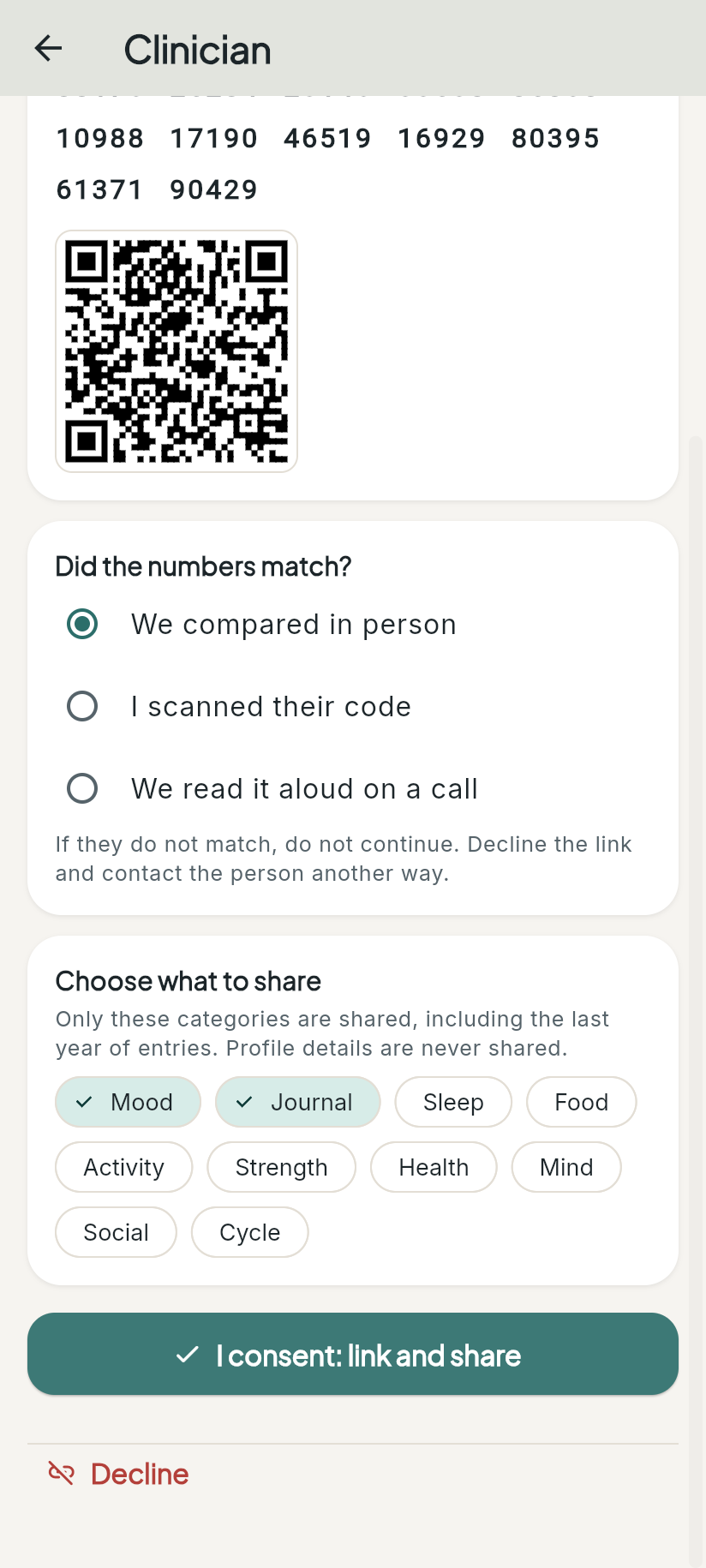
Then:
- History: the past year of entries in the chosen categories is shared with you, encrypted so only your device can open it.
- Going forward: new entries in those categories are shared as your client saves them.
- My clients shows the client with the categories they share (for example “Sharing Mood, Journal”).
- Tap the client, then Shared entries, to read what they shared, grouped by day. It’s decrypted on your device.
- You only ever see the categories your client chose. If they share Mood and Journal, you won’t see their sleep, food or cycle data.
- Your client can change the categories at any time. Adding a category shares that category’s past year too. Removing one stops sharing it, including past entries.
[Placeholder: screenshot of an active link in My clients (“Sharing Mood, Journal”) and the Shared entries page. Not yet captured on the POC.]
6. Ending a link (revocation)
- Your client can end the link at any time (Stop sharing and unlink). You lose access to everything they shared, right away, and nothing new is shared.
- You can end it too. Open the client and tap End link. You’ll lose access to everything that client shared with you.
- If your client deletes their BPS Insights account, their links end as well.
- An ended link shows “This link has ended. Nothing more is shared.”
- An honest limit: anything you already read or wrote down outside the app can’t be “unseen”. If you need to keep something for your records, record it in your own record system, following your usual obligations.
To link again, send a new invite code.
7. Privacy: who can read what
| Who | Can they read the client’s health data? |
|---|---|
| The client | Yes, on their own device. |
| You (linked clinician) | Only the categories the client shares, on your device, while the link is active. |
| BPS Insights server | No. It stores encrypted data it has no key for. |
| BPS Insights admins and staff | No. |
How it works, in brief:
- Each person has security keys that are created on their own device (X25519 for encryption, Ed25519 for signing).
- Each entry is locked on the client’s device. When a client shares a category with you, the app adds a copy of that entry’s key that only your key can open.
- When a link ends, those copies for you are deleted.
Minimum necessary: the client chooses categories, and nothing is shared by default. Consider asking only for what helps your work together. For many therapists, that’s Mood and Journal.
Compliance: BPS Insights is built with HIPAA safeguards; formal review pending. No other compliance claims are made.
8. Known POC limits
| Limit | What it means for you |
|---|---|
| No QR scanning yet | The QR code is shown, but the app can’t scan it. Compare the digits instead. |
| No pause | A link is either on or ended. To stop sharing for a while, the client has to end the link, and you’d send a new code later. |
| Each side sees the other’s email | Your client sees your email address and you see theirs. Use an email you’re comfortable sharing. |
| Clinician MFA isn’t enforced yet | Use a strong, unique password. Multi-factor sign-in for clinicians is planned. |
| Shared entries view | The past year is shared, but the Shared entries page currently lists the last 90 days. |
| Not a record system | There’s no export into your EHR yet, and no clinician notes or signed documents yet. |
| Proof of concept | Expect rough edges, changes and possible downtime. |
Planned (not available yet): therapy programs and tags (for example, an exposure ladder for needle phobia), barcode scanning for food, and a clinician portal with signed documents.
9. FAQ
Does it cost anything? The client app isn’t behind a paywall. Clinician pricing hasn’t been decided. [Placeholder: pricing to be decided.]
Can I invite more than one client? Yes. Each invite code works once, so make a new code for each client.
My client’s code says it’s expired or invalid. Codes work once and expire after 7 days. Create a new one.
Can I see everything my client logs? No. You only see the categories they choose, and they can change or end that at any time.
Can BPS Insights staff read my clients’ entries? No. The data is encrypted on the client’s device, and the server and admins don’t have the keys.
What if the safety numbers don’t match? Don’t continue. Decline the link and contact your client another way. A mismatch can mean you’re linked to the wrong person, or that someone is trying to intercept.
What if I see a warning that my client’s security key changed? This happens after a new device or a password reset. Compare the new safety number with your client before relying on the link. New entries aren’t shared with you until your client compares it.
Is there video? Yes, 1:1 video calls are available in the Care tab. In the POC this is a test call: both people enter the other person’s email and the same passphrase.
What do the follow-up check-ins show? About 35 minutes after an intense mood, the client gets a notification asking how they feel now. If they share Mood, you’ll see the before and after.
Is it HIPAA compliant? It’s built with HIPAA safeguards; formal review pending.
Who do I contact? Brian Bergen, owner of BPS Insights. [Placeholder: support contact address.]